Put your logo on it
By the end of this page your logo, your colour and your font will be on the video, and on every video you make after it.
Your brand
A brand is your logo, font and accent colour, put on top of whichever look you choose. It stays when you change the look or the camera template, and it travels inside the project file.
Make the brand
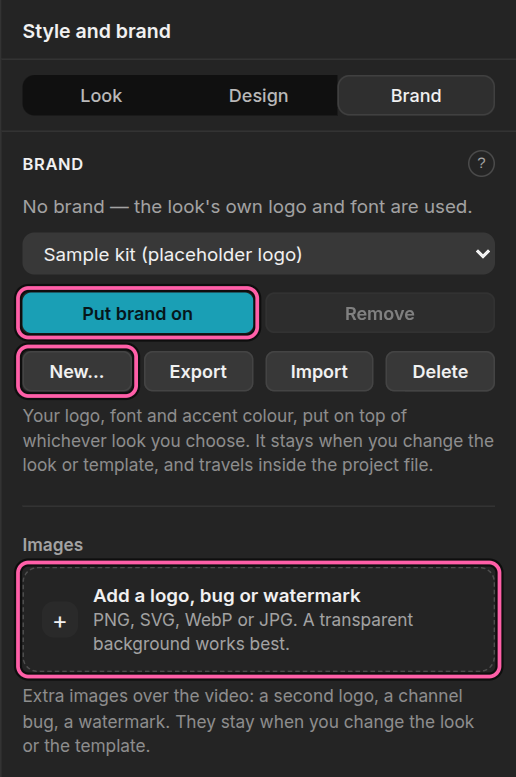
Open the Style panel and choose Brand. Click New…, give it a name, choose your accent colour, and add your logo (PNG or SVG) and your font (TTF, OTF or WOFF2). Leave the font or the logo empty to keep the look's own. Then click Save brand.
Put it on
Click Put brand on. Your logo, font and colour are on the video at once.
Taking it off brings everything back. Remove returns the look underneath exactly as it was, so trying a brand is always safe.
More pictures: a bug or a watermark
Under Images in the same panel you can add more pictures over the video, such as a second logo, a channel bug or a watermark. Click Add a logo, bug or watermark, click the image in the list, then set it up:
- In a corner: it takes the corner itself, and the other graphics there stack inward from it. Nothing is covered.
- Free: it sits exactly where you put it on a five-by-five grid, and may cover other graphics. Behind the graphics puts it under the title, card and legend.
- Size is the width as a share of the short side of the frame, so an image is the same size in 16:9 and 9:16.
- Appears: the whole video, or only between two times, fading in and out.
To use the same images in every project, choose Keep these images with brand.
What next
- Make the same video for phones — your brand reflows with it
- Render a new video on every advisory — with your brand on every one